


What Is an Internal Knowledge Base and How to Build One

Written by: Shushmmitha (Technical Content Writer)
Reviewed by: Sid (Industry Specialist)
Inside the article
Key Takeaways
- An internal knowledge base is a centralized repository of information created specifically for an organization's employees.
- An internal knowledge base addresses several workplace challenges, including onboarding difficulties, repetitive questions, and knowledge loss.
- Most internal knowledge bases fail because of improper content ownership and poor search results, leaving knowledge contributors unrecognized.
- You can build an internal knowledge base by setting a clear goal, assigning clear article ownership, making it search-friendly, recognizing knowledge contributors, and setting clear measures to use the internal knowledge base.
Summarise this blog for me
Too busy to read the full article? Get a quick summary in your preferred AI tool.
Employees are the roots of organizational knowledge. The internal knowledge base is the tree’s branches, connecting knowledge and helping employees do their day-to-day work without disruption.
In this blog, let's explore internal knowledge base use cases, best practices, examples, and more.
What is an internal knowledge base
An internal knowledge base is a centralized, private repository of information created exclusively for internal teams, departments, and individual employees. It serves as a useful companion for employees, helping them resolve work-related problems by providing the information and knowledge they need.
Internal vs External vs Wiki
What goes inside an internal knowledge base
An internal knowledge base contains structured knowledge from subject matter experts to help employees. Employees often hold the organizational knowledge scattered across files, folders, binders, sticky notes, and documents. That's where an internal knowledge base comes in: it unifies that scattered information.
Why teams need an internal knowledge base
Onboarding runs on interruption without one
Onboarding is the formal process of introducing a new employee to the organization. According to Atlassian's state of team report, 56% of employees ping someone or schedule a meeting to get the information they need.
For example, new employees may start with questions like, “What resources, tools, or documentation are available to help me get started?” They may immediately go to ask a senior colleague for answers.
An internal knowledge base provides answers to these questions through required resources like employee runbooks and training materials.
The same answer gets rewritten every week
In an organization, employees often ask the same questions repeatedly. Employees from different teams may have common questions like “How do I request leave?” Here, the HR team keeps giving the same answer to different employees. This frustrates HR employees and makes them impatient. This can be an early warning sign of declining productivity.
An internal knowledge base overcomes this hurdle by giving all employees access to leave policies.
Knowledge leaves when people do
Knowledge often stays with employees as they leave. They take that knowledge with them; it is like part of the organization’s assets leaving its walls. According to Sinequa, 64% reported that their organization had lost knowledge when employees left.
For example, a senior developer holds years of coding experience, but the knowledge is scattered across code repositories, documentation, chats, tickets, personal notes, and shared drives. These valuable insights can be converted into a structured employee runbook, allowing the internal knowledge base to preserve the senior employee’s knowledge before they leave.
Internal knowledge base examples
Customer support team
Customer support teams contain knowledge resources like:
- SOPs: Step-by-step documented procedures that help support agents handle repeated customer situations and ensure customers get an appropriate response, no matter who they interact with.
- Macros: Templates of saved responses used to answer common questions.
- Escalation paths: Documented roadmaps that guide support agents to escalate an issue to someone with more expertise, authority, or responsibility when they can’t resolve it at the current level.
Engineering team
The engineering team holds knowledge resources such as:
- Runbooks: A runbook is a detailed how-to article that provides a step-by-step procedure for executing tasks, especially in IT teams, such as deployments, configuration changes, port openings, and more.
- ADRs (Architecture Decision Records): ADRs are short documents that record technical architecture decisions; for example, to deploy a webpage, you can use Git or Vercel, but the team finds Git more efficient, and the ADR documents the decision and the reasons behind it.
- Technical decisions: A document that contains a collection of decisions made on technical aspects like using a specific development framework, database technology, and structuring the API.
HR and People Team
HR teams include knowledge resources such as:
- Onboarding checklists: Step-by-step procedures covering pre-onboarding, onboarding, and post-onboarding processes that the HR team must complete.
- Employee policies: A structured set of guidelines covering workplace conduct, time reporting, leave policy, disciplinary actions for misconduct, etc.
- Benefits guides: Documents that include information about employee benefits like ESI and other compensation, such as perks, incentives, referral bonuses, and more.
Sales team
The sales team has knowledge resources like:
- Objection handling: A set of documented techniques to handle customer objections and pushback during the sales process. It also includes strategies to convince customers and achieve a profitable outcome during sales negotiations.
- Pricing: A detailed document that explains the cost of the product or service offered over a particular tenure period.
- Competitive intelligence: A documented outcome from a systematic process of collecting and analyzing a competitor's pricing plan, sales tactics, brand positioning, and more.
Every team relies on diverse resources to work effectively, and an internal knowledge base brings them together in one accessible place, letting employees quickly find the information they need without manually searching across multiple sources.
Why most internal knowledge bases fail
No ownership and content decays quietly
Most internal KBs fail when the knowledge owner leaves the organization; without updates and future enhancements, the information becomes outdated. It makes your knowledge base stale as obsolete information stagnates. Over time, it can erode organizational knowledge.
A real-world pain point: what Redditors are saying
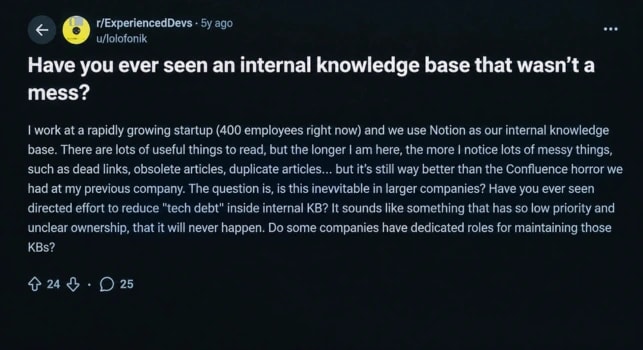
Image source: Reddit
A Redditor discussed a problem at their workplace: handling dead links, obsolete articles, and duplicate content in their internal KB because nobody owns it. This happened because of unclear ownership.
Learn about knowledge management strategies that actually work to overcome real-time struggles.
Poor search makes findability impossible
Slite's 2026 survey found that internal enterprise searches have only a 10% first-attempt success rate. An unorganized, unmaintained internal KB can reduce search success and return irrelevant information.
Knowledge contribution has no clear reward
A knowledge management priority and trend report states that 38% of organizational culture leaves the knowledge contributor unrecognized. As a result, they lose interest in contributing knowledge, which leads to knowledge hoarding. Organizations are left with knowledge gaps that adversely affect employee productivity.
How to build an internal knowledge base that gets used
Start with goals and scope, not software
Build an internal knowledge base by defining its scope and purpose, not by choosing software first. The scope of the internal KB must include who the users are and what it should answer. The end goal is to deliver the right information to the right person through the internal KB.
Assign owners before you write a single article
Assign appropriate knowledge owners to write the article. Knowledge owners shouldn't just write the articles; they must own them by updating the content and keeping it current. Take proactive measures to change ownership. If an employee leaves or changes roles, transfer their knowledge and responsibilities to another owner.
Build for search, not for filing
Keep in mind that an internal knowledge base must provide the right information at the right time. It is not just about overloading with information.
Read this article to learn how information overload hurts productivity.
To make your internal KB searchable, follow the steps below to optimize its content for search:
- Step 1: Use clear, descriptive titles for internal KB articles so users can quickly understand what the content answers.
- Step 2: Use consistent terms and language that employees actually use to curate the content.
- Step 3: Add metadata to help users navigate the content and narrow search results with parameters like department category, access level, author name, creation date, and last updated date.
- Step 4: Structure content for quick answers with bullet points, FAQs, and clear explanations.
Make contributing easy and visibly worthwhile
Employees should make knowledge contributions to the internal KB as part of their everyday workflow with minimal effort. You can do this in several ways, such as by providing prebuilt templates for effective knowledge resources like FAQs, How-to articles, and runbooks.
Encourage employees to capture knowledge while it is fresh by having them document the solution as soon as they solve the problem. Recognize knowledge contributors in team meetings, through leaderboards, badges, and other appreciation. This creates an opportunity to gain exposure and showcase knowledge contributions.
Measure adoption from day one
Create useful measures to encourage active use of the organization's internal knowledge base from day one.
This can be initiated in the following ways:
- Encourage employees to use it as part of their day-to-day operational work.
- Introduce the internal KB to new recruiters early in the training phase so they can access training and onboarding materials.
- Closely track each team's user engagement with the internal KB.
- Insist that team leaders make team members use the knowledge base as part of the sourcing process.
Learn more about building a knowledge base in 7 steps.
Choosing an internal knowledge base platform
What to evaluate before choosing a platform
Before choosing an internal KB platform, evaluate the factors that are mentioned in the checklist below.
- Search capability and AI features: Check whether your internal KB has context-based capabilities and AI features like content summarization.
- Identity provisioning: Determine whether the platform supports identity provisioning for user account and access management, like SSO and SCIM.
- Compatibility: Know about the compatibility of the internal KB with the organization’s knowledge resources and existing platforms like Slack, Notion, and Google Drive.
- Type of installation: Identify the available installation options, such as cloud-based installation or self-hosted deployment.
Questions to ask during evaluation
This is a list of common questions that you must ask the vendors while evaluating the internal KB:
- Can people find pages using natural questions, typos, synonyms, and terms that do not match the page title?
- Can content be structured by team, topic, product, or process without becoming an unmanageable folder tree?
- Can we restrict HR, finance, security, or manager-only content?
- Are answers grounded in approved internal pages, and do they cite the source?
- Are there any limits on users, storage, searches, or knowledge sources?
- Do we need cloud, self-hosted, on-premises, or data-residency options? Can we export all content if we later switch tools?
- Does the purchased plan include installation, ongoing maintenance, SSO, and SCIM provisioning, or are they charged separately?
- Does the organization need any hardware requirements to run the platform?
Internal knowledge base platforms to consider
Accurez
Accurez is a self-hosted internal KB platform. It offers hybrid search to retrieve answers based on query context, source citations to ground answers, and a dedicated AI assistant. It supports identity provisioning, including SSO and SCIM, along with essential features. Accurez can be integrated with external sources like public URLs, Notion, and Google Drive.
Maintain greater control with self-hosting
Accurez provides greater control over data, as uploaded knowledge stays within your organization’s infrastructure. It provides secure protection for confidential client data. As a self-hosted platform, you can download it once and use it across multiple systems.
Accurez provides AI provider options, such as Ollama and Hugging Face, that can run on your own server.
Suitable for: Mid-sized organizations in the healthcare and legal industries.
Guru
Guru is a well-known internal KB platform. It has essential features like source citations grounding each answer, usage-driven improvement, permission-aware answers based on user roles, context-based search, and more, with SCIM and SSO provisioning. Guru offers a wide library of external tools and platform integrations.
Suitable for: Large enterprises across multiple industries.
Bloomfire
Bloomfire is a renowned internal KB platform. It includes key features like AI search, content creation and management, and SOC 2 Type II certification. It also supports external tools and knowledge connectors.
Suitable for: Large enterprises across multiple industries.
Can ChatGPT replace an internal knowledge base?
ChatGPT can’t fully replace an internal knowledge base, but it can serve as an alternative with specific constraints. General LLMs have a high chance of giving hallucinated answers based on previous conversations and chat history. ChatGPT lacks automation to organize links, file taxonomy, and information. Security limitations also apply to the data you send to the system, since it runs on OpenAI infrastructure.
A Reddit user's frustrating experience with ChatGPT
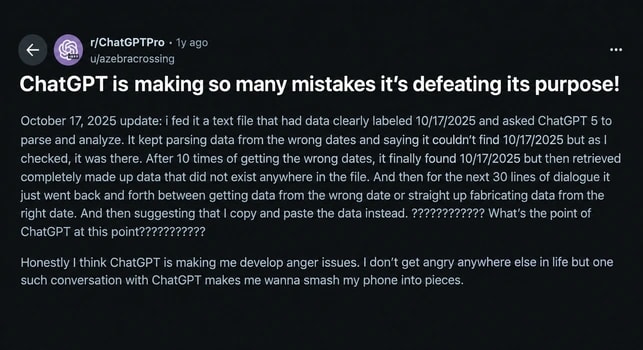
Image source: Reddit
A Reddit user reported that ChatGPT repeatedly generated fabricated information while analyzing an uploaded text file. This shows that without reliable source grounding, AI can produce convincing but inaccurate answers instead of retrieving the information employees need. Therefore, ChatGPT is not suitable as an internal knowledge base.
Internal knowledge base best practices
- Keep content fresh with expiration dates: Add expiration dates to articles and require authors to include them with the publication date.
- Connect the KB to tools your team already uses: Connect your knowledge base to day-to-day usage tools like Slack, Google Drive, Notion, and other knowledge connectors.
- Build a feedback loop into every article: Add a review section under every article to understand the user experience and fill knowledge gaps from feedback; fix the holes; don't make it a loophole.
- Use zero-result searches to guide new content: Convert zero-result queries into content topics to help your knowledge base meet user intent and uncover hidden knowledge areas.
- Audit content on a quarterly cadence: Schedule regular content audits quarterly to prevent expired content from stagnating.
Get instant answers from your documents
Conclusion
An internal knowledge base is more than a place to store company documents. When it is well-structured, searchable, regularly maintained, and owned by the right people, it becomes a reliable source of knowledge that helps teams work with fewer interruptions and less dependence on individual employees.
As a result, it strengthens the organization’s knowledge assets. I hope this blog has given you valuable insights on internal knowledge.
How we researched this article
Published research supports the statistics and claims in this article.
Statistics and claims in this article come from these sources.
Written by: Shushmmitha (Technical Content Writer)
Reviewed by: Sid (Industry Specialist)
Get instant answers from your documents
Similar blogs


See Accurez for yourself
Come with questions and meet the people behind the product.