


What Is an Enterprise Knowledge Base, and Who Needs It

Written by: Shushmmitha (Technical Content Writer)
Reviewed by: Sid (Industry Specialist)
Inside the article
Key Takeaways
- An enterprise knowledge base is a centralized knowledge repository where an organization stores, organizes, and provides access to its internal knowledge and information.
- The real problem is knowledge living in a single employee and not being documented; information that employees can't retrieve; knowledge disappearing when employees leave; and using general LLMs without considering data privacy.
- An enterprise knowledge base supports systems like intranets, ticketing platforms, collaboration tools, and AI assistants.
- Enterprise knowledge bases support various industries, including healthcare, IT and service teams, finance and insurance, manufacturing, and retail.
- Building an enterprise knowledge base involves auditing existing sources, identifying knowledge gaps, defining your audience, choosing the right KM platform, capturing knowledge, and maintaining the knowledge base.
Summarise this blog for me
Too busy to read the full article? Get a quick summary in your preferred AI tool.
What is an enterprise knowledge base
An enterprise knowledge base is a repository of internal knowledge used by the entire organization. Organizations rely heavily on digital files, drive links, shared folders, and other forms of digital records.
The enterprise knowledge base serves as a platform to store, update, and organize these digital assets. It centralizes them and helps teams retrieve information across the organization.
The real knowledge problem
Employees hold knowledge that is not documented
“Knowledge has to be improved, challenged, and increased constantly, or it vanishes.”
A senior employee has gained years of knowledge working in the organization, but the problem is that it must not stay with them. It can be knowledge gained by a single individual, but it is an organizational asset; it must be shared, documented, and transferred. Over time, if the knowledge gets buried with one person, it can vanish.
Employees waste time searching for information
According to a Service Analyst survey, 25% of employees in Russian companies spend up to an hour searching for information. One-fourth of employees struggle to find information, draining the organization's time and resources.
Think about what happens if it hits 100%: everyone loses. It’s like having a library full of valuable books, but no catalog to tell you where to find them.
Knowledge is lost when employees leave
An organization can lose knowledge when an employee leaves. If an employee leaves, they take critical knowledge with them. If this happens repeatedly, the organization may face serious loss in productivity and outcomes.
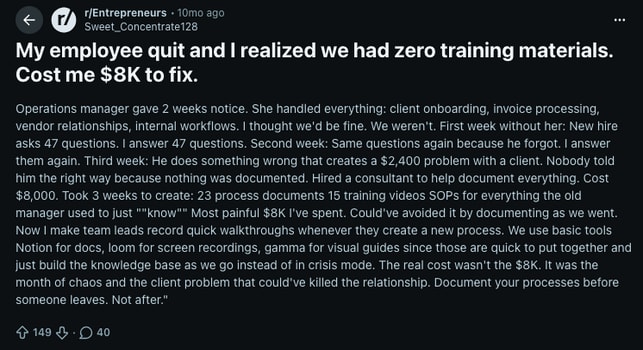
Image source: Reddit
A business owner on Reddit shared that their operations manager left, taking important knowledge about client onboarding, invoices, vendors, and internal workflows with them.
Because the company hadn't documented this knowledge, they dealt with repeated questions, a client error, and an $8,000 bill to create documentation. After that, they began recording processes and building a knowledge base as they worked.
The enterprise knowledge governance gap
Your organization's proprietary and sensitive information, like operating procedures, policies, and other intellectual property such as trade licenses, trademarks, and patents, should not be given to general-purpose LLMs.
But employees often don't take this seriously; they keep pasting sensitive information.
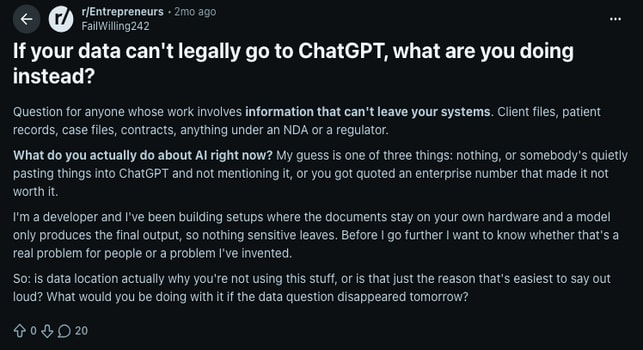
Image source: Reddit
In the Reddit discussion above, the redditor highlights the importance of keeping data within the company's environment and adopting enterprise AI.
If you are an enterprise or knowledge manager looking for a self-hosted knowledge base, Accurez can keep your data private and secure. It is an AI-powered knowledge base software. Because it is self-hosted, it runs on your company's infrastructure, and your data never leaves your walls.
What types of systems support enterprise knowledge management?
Company intranets and documentation platforms
Company intranets and documentation platforms act as an important part of an enterprise knowledge management system. An intranet serves as a central, authorized network for sharing information and makes communication easier.
It acts as a key to knowledge sharing across the enterprise. Documentation platforms help capture, store, update, and share information in documents across the enterprise.
Communication and collaboration platforms
Communication and collaboration platforms act as a medium for knowledge sharing across the organization. Official enterprise communication tools like email, Slack, Microsoft Teams, and Zoho Workplace help keep teams connected and foster a collaborative environment.
For example, if the Technical team announces a new product update through a Slack message, all team members receive it. Over time, this information becomes shared knowledge across the team.
Service management and ticketing platforms
Service management platforms handle a wide range of tasks, including planning, delivery, and the support needed to deliver the customer's IT services. As a result, service management platforms hold highly valuable knowledge based on the organization's resources.
Ticket management platforms like Jira, ServiceNow, and Freshservice store multiple pieces of information about recorded problems and suitable solutions. This becomes available knowledge if the same problems arise again.
Enterprise search and AI assistants
Enterprise search lets you find information within your enterprise. Here, the database crawls and indexes the data, and when an end user queries it, enterprise search retrieves the relevant information.
AI assistants are AI-enabled chat assistants dedicated to a single team, where they find information in documents uploaded for that team, or the entire organization can get answers from uploaded public documents visible to them.
Enterprise knowledge base industry use cases
IT and internal service teams
IT teams use an enterprise knowledge base to store, capture, and organize technical knowledge sources like API documentation, release logs, troubleshooting guides, and other technical documents. When retrieving relevant information from these sources, IT teams need grounded answers to implement tasks.
Service teams use an enterprise knowledge base as a centralized repository of FAQs, user manuals, and how-to articles to answer questions raised in support and even by consumers.
Financial services and insurance
Financial services maintain balance sheets, Income statements, ledgers, invoices, and bank statements in their knowledge base. Here, knowledge sources in the enterprise knowledge base act as key financial holdings and physical assets in financial decision-making.
Insurance teams manage knowledge sources such as insurance quotes, KYC verification documents, and product brochures. Here, answers retrieved from knowledge sources in the knowledge base serve as verification and operational support for the insurance provider and claimant.
Healthcare and life sciences
The healthcare industry is one of the most prominent and lively industries in the world. The healthcare industry manages a variety of documents, including patient records, treatment protocols, hospital policies, SOPs, infection control policies, etc.
A knowledge base is essential because, in healthcare, staff must retrieve the right information at the right time; incorrect information can be life-threatening.
Learn more about the benefits of knowledge management in healthcare.
Everything must be documented in the life-science field. For example, new pathological findings must be documented because they can help in vaccine development. Here, we can clearly see the need for past findings and records; however, manually maintaining them and extracting insights can be difficult, so knowledge base software can support or serve as the backbone for new medical inventions.
Manufacturing and industrial operations
The manufacturing industry needs to document day-to-day activities like manufacturing guidelines, product counts, defects, and operational procedures.
All of this acts as proof that work is happening. Documenting all of this increases the volume of documents in the enterprise; therefore, an enterprise knowledge base is crucial for extracting information from piles of documents.
Retail and e-commerce
The retail and e-commerce industry is fast-moving. Interactions happen at both ends: customers and suppliers. Employees often don't have time to document information, and the system gets overloaded.
Every action requires up-to-date information, including shipping, dispatch, supplier, payment, and more; everything must be documented and accounted for. This is where knowledge base software comes in.
How to build an enterprise knowledge base step by step
Step 1: Audit your knowledge sources and identify gaps
Audit your knowledge sources. Review the latest content updates and revision dates, and check for duplicate information across sources.
Find departments in your organization that haven't updated their team's knowledge sources. This helps you identify knowledge gaps.
Step 2: Define your audience and access levels
Identify the knowledge base's end users and curate content based on their needs. For example, technical teams need content with proper technical terms, while the sales team needs general, understandable, plain-language content.
Know the difference and create content in the knowledge base source. Based on content needs, define access levels; RBAC (Role-based Access Control) is often best.
Step 3: Choose the right platform and technology
Many technologies can build a knowledge base, including NLP, RAG, Gen AI, and more. Based on your technical requirements, choose the right technology.
If you don't have the time and resources to build a KM platform by yourself, there are many knowledge base platforms available on the market. Some providers offer knowledge base software through monthly subscriptions. Ask about the length of technical support after you launch. Some providers also offer one-time payment.
Accurez is an AI knowledge base platform that offers a one-time payment.
Step 4: Define ownership and governance from day one
Assign specific people or teams to create, review, update, and approve content. Make sure everyone knows who is responsible when information is outdated, incorrect, or duplicated. Establish clear rules for content quality, access, permissions, review cycles, version control, and when to retire content.
Step 5: Capture tacit knowledge, not just documents
Tacit knowledge comes from years of practical experience, skills, and intuition. You must capture it; simply documenting it is not enough. Run practical workshops and live, interactive sessions to transfer tacit knowledge to junior employees and senior executives.
Step 6: Structure content and connect it to where work happens
Structure the content in an easily readable way. Avoid information overload and long paragraphs; keep the content skimmable with bullet points and clear subheadings.
Ensure your knowledge base connects across the entire organization and reaches the right people to support smooth operations.
Step 7: Launch narrow, prove trust, then expand
Choose a department that receives many information requests, such as HR policies, IT support, or customer support. Start with documents that have already been reviewed, are current, and are approved, rather than bringing everything in at once.
Clearly cite your sources, use only approved content in your answers, and provide a way for people to report incorrect or outdated information. Look for missing details or topics that people search for often, and update the knowledge base as needed.
Once the first area runs smoothly, you can add more departments, new content types, and different use cases.
Step 8: Keep your knowledge base updated regularly
Once your knowledge base is live, start collecting user feedback and use it to improve. Monitor how the knowledge base performs and fix any issues you find. Check which questions are searched for most often and which ones go unanswered, so you know where to add or update content. By making these ongoing updates, you’ll keep your knowledge base accurate, relevant, and helpful.
How AI is transforming enterprise knowledge management
Cerebras is an AI infrastructure company that implemented an AI enterprise knowledge base to connect staff and help them access information. It is a RAG-based enterprise knowledge base that implements hybrid search because vector search alone was insufficient.
An LLM summarizes the answer for each question. The PostgreSQL database collects all required data, including Slack threads, Google Docs, and other sources. The enterprise knowledge base has had a huge impact, answering 15,000 queries from humans, automations, and agents.
Get instant answers from your documents
Conclusion
An enterprise knowledge base offers value beyond simply storing information. A strong enterprise knowledge base connects teams and solves real-world knowledge problems.
Enterprise knowledge bases are used across multiple industries, depending on each industry's knowledge needs. I hope this blog has given you a good overview of the various aspects of enterprise knowledge bases.
How we researched this article
Published research supports the statistics and claims in this article.
Statistics and claims in this article come from these sources.
Wikipedia - https://en.wikipedia.org/wiki/Peter_Drucker
Written by: Shushmmitha (Technical Content Writer)
Reviewed by: Sid (Industry Specialist)
Get instant answers from your documents
Similar blogs




See Accurez for yourself
Come with questions and meet the people behind the product.