


What is a Healthcare Knowledge Management System?
A healthcare knowledge management system is how your organisation stores and retrieves the information your team reaches for every day. The answers are already there - inside your policies, billing procedures, handbooks, and operational documents. The problem is getting to them quickly when someone actually needs one.
Accurez puts those documents into one self-hosted knowledge base. Your team asks in plain language and gets a cited answer back, not a list of files to open.

From document to verify answer
How it works three steps
Add your healthcare documents
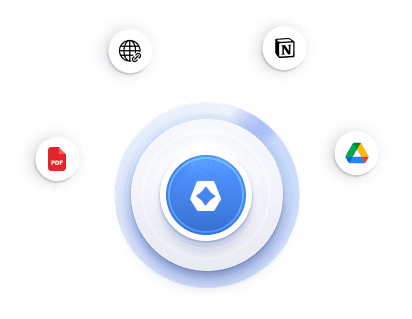
Upload PDFs, plain text, or Markdown files. You can also sync selected Google Drive folders or Notion pages, or paste a public page URL. After indexing finishes, documents are ready to search.

Ask in plain language
Type the question the way you would say it out loud to a colleague. No commands, no filters, no special format. Accurez searches across everything you have uploaded.

Get a cited answer you can check
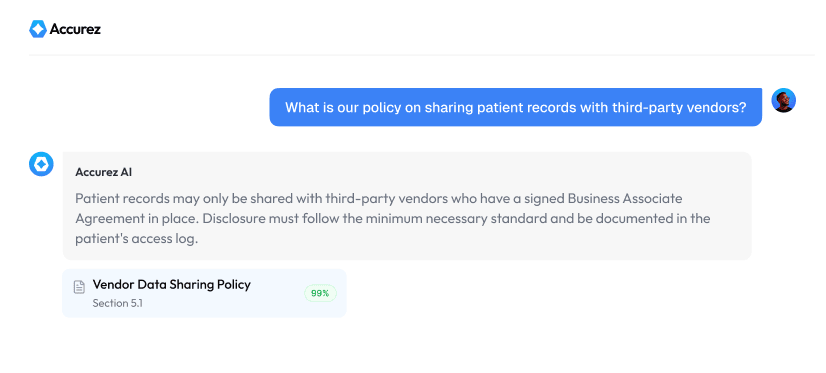
You get a direct answer in plain language. If the answer comes from your documents, Accurez shows which document and which section it came from. A confidence level - High, Moderate, or Low - tells your team how strongly the answer is backed before they act on it.
Built for accuracy your team can trust
Every capability below exists in the product today - designed so healthcare teams can trust answers that come from documents they already own.


Cited answers from your own healthcare documents
Every grounded answer shows the source document and exact excerpt. Your team sees where the answer came from before acting on it.

Confidence levels that signal how strongly an answer is supported
Every response comes with High, Moderate, or Low confidence. Your team knows how strongly the answer is backed before they act.

Self-Hosted Healthcare Knowledge Base on infrastructure you control
Accurez runs on your own servers. Your documents and search index stay in your environment. AI provider is your choice, including fully local options.

Plain-language search across policies, billing rules, and SOPs
Ask the way you would ask a colleague. Accurez searches by meaning and keyword together so the right document surfaces even when the wording does not match exactly.

Department-scoped assistants for compliance, billing, HR, and Ops
Create separate assistants for different teams, each limited to the documents that team should use. Every team stays in its own lane.

Bring healthcare documents in from upload, Drive, Notion, and the Web
Upload PDFs, sync selected Drive folders or Notion pages, or paste a public page URL. Start with the documents your team already has.

Visibility controls for public, internal, and restricted knowledge
Each document gets a visibility level. Sensitive content stays in staff-only areas. Public content goes to your help center when you want it there.

Analytics that show where Healthcare Knowledge falls short
See which questions came back with no useful source. That tells you exactly which documents are missing or need updating.

Security and audit logging for accountability
A filterable log of authentication events, admin actions, and chat activity - with timestamps and CSV export for internal review.

Streaming answers, chat history, and browse-or-ask workflows
Answers stream as they generate. Past conversations stay in history. Staff can browse articles or ask in chat - both work from the same content.
Built for roles across your organisation
Across healthcare operations, Accurez delivers cited answers from your documents.
Find the right policy before the audit finds you
When an audit question comes in, your compliance team should not be opening three folders to find the right policy wording. Ask Accurez and get the exact clause from your own uploaded documents - source shown, ready to verify before anything is communicated.
Where your healthcare data lives
Accurez runs on your own servers. Your documents and search index stay inside your environment - Accurez does not host your corpus as a default SaaS store.
Your administrators choose the AI provider that fits your organisation's policy. For teams that need generation to stay on the network, a local model (for example via Ollama) keeps chat and embeddings on your own hardware. If you choose a cloud AI provider, prompts and retrieved context go to that provider.

Source Citations
Audit Trail
Private Deploy
Local AI Option
Accurez vs Typical cloud knowledge bases
How our Knowledge Base connects with your tools
Bring your documents into Accurez so your teams can search and ask in one place.
Direct Document Upload
Upload PDF, plain text, and Markdown files directly into Accurez.
Articles
Write and publish knowledge articles natively inside Accurez with draft, publish, and version history built in.
Website URLs
Paste a public page URL and Accurez indexes the page content into your knowledge base.
Google Drive
Connect once and sync selected Drive folders. Run sync when you want Accurez to pick up updates from those sources.
Notion
Sync selected Notion pages into Accurez so your existing workspace content becomes searchable.
 Coming Soon


See Accurez working live on your own documents
What your session covers:
Walk through the full flow from uploading your documents to asking a question and getting a cited answer with source citations in real time
See how your internal policies, procedures, and guidelines work inside Accurez with answers pulled directly from your own files
Understand how self-hosted deployment works and how your team chooses between cloud and local AI based on your privacy needs
Get answers to your specific questions about compliance workflows, document management, and deployment from an Accurez specialist
See it working with your own documents
Give your team cited answers from the documents they already have - on infrastructure you control.