


What Is Legal Data Management and Why Should You Care

Written by: Shushmmitha (Technical Content Writer)
Reviewed by: Sid (Industry Specialist)
Inside the article
Key Takeaways
- Legal data management is the collective process of capturing, storing, structuring, and organizing legal data.
- Common challenges in legal data management include duplicate document versions, retrieving information from documents, unclear ownership of key files, the risk of unauthorized access to sensitive data, and scattered legal information across multiple tools.
- The core components of legal data management include organizing and classifying legal data, assigning clear data ownership, implementing security measures, and having a structured plan for data backup and recovery.
- Legal data compliance includes the CCPA, CPRA, and state-specific privacy laws.
- Effective data management provides faster access to accurate information, fewer duplicate files, protected confidential legal information, and lower eDiscovery costs.
- AI is changing legal data management by letting you search legal data using natural language, find information across multiple files, and get grounded answers with source citations.
Summarise this blog for me
Too busy to read the full article? Get a quick summary in your preferred AI tool.
What is legal data management?
Legal data management is the process of capturing, organizing, collecting, storing, and managing legal data. A law firm’s data is its vault of trust because clients trust it and share sensitive information. Therefore, legal data is an asset and must be kept secure.
Data are raw facts that become information when structured to provide meaningful insight. Law firms must maintain and manage a wide range of legal data, including client data, compliance data, billing data, employees' internal data, and other law firm-related data.
Common legal data management challenges
Duplicate versions of contracts and documents
Handling duplicate versions of documents and contracts is a common challenge for law firms. This happens because contracts undergo multiple rounds of drafting, review, and negotiation.
For example, an attorney may search the law firm's binders for a partnership agreement between two parties and find the contract drafted when the agreement was signed, but not the renewed contract with the latest amendment.
This happened because two binders list the same contractor's name, and each contains the same contract. The binder name was not updated with the latest date after it was drafted under the latest regulation.
No clear owner for privileged or sensitive files
Law firms hold sensitive, privileged client matter history for all cases. Law firms record all such matter histories in case files. These case files document past incidents, current legal status, court filings, key dates, and judgments.
If the case file is vulnerable to physical theft or a digital breach, the opposing party could gain access to it. This could help the opposing party win.
Risk of unauthorized access to sensitive legal data
Unauthorized access happens because organizations don't implement role-based access control.
Think about it: if your law firm holds a well-reputed business trade secret that drives major profit, what happens if it leaves the organization's walls? It can destroy the law firm's reputation, damage the business, and erode its profits.
Legal information spread across too many tools
Legal information is often spread across multiple tools, including communication channels, document management tools, case management software, and billing tools.
Each tool handles valuable information based on its purpose, and most carry interdependent data. This makes it hard to retrieve information when you need it, and each tool contains a huge volume of legal information. Look at what this frustrated Redditor says about managing legal data:

Image source: Reddit
Poor file organization
Poor file organization wastes time and delays day-to-day activities in a law firm.
For example, an attorney may search for case pleadings to apply legal precedent but struggle to access them because piles of documents are spread across multiple case files in the same drawer.
Difficulty tracking case tasks and deadlines
Law firms must handle large caseloads. This makes it hard to track deadlines for individual cases.
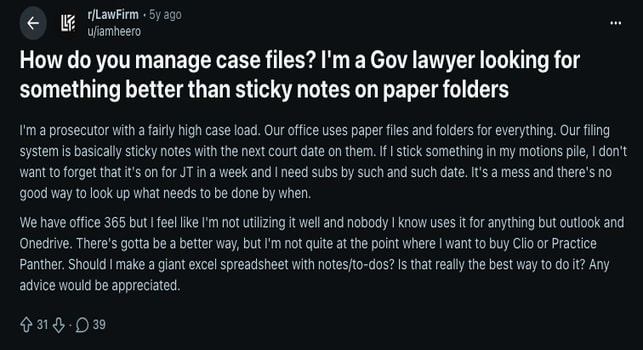
Image source: Reddit
A prosecutor highlighted on Reddit that they have huge caseloads and use paper files, folders, and sticky notes to track case tasks and deadlines, and described the struggle and mess it creates.
Time-consuming legal document review
According to the 2025 Bloomberg Law Attorney Workload Survey, attorneys spend 15 hours per week reviewing legal documents. Legal document review is a core part of legal research.
But it's time-consuming because each attorney must review and extract insights from a huge volume of legal documents. For example, finding a particular clause in a case file can take more than two hours for cases that have been ongoing for years.
The building blocks of legal data management
Data organization and classification
The first step in organizing legal data is to classify it by timeline. After classifying legal data and documents by timeline, organize them by legal taxonomy. A legal taxonomy provides a structured way to group information by legal purpose or subject. Create categories such as compliance, litigation, intellectual property, contracts, employment, corporate matters, and regulatory requirements. You can further divide these categories into subcategories.
Data ownership and governance
Clearly draft a set of rules and policies for data ownership. The rules and policies must include workflows to preserve data quality and uphold data security by defining ownership and establishing appropriate access levels and permissions. Educate the firm on these rules and make them visible to everyone; you can even pin them on the notice board.
Access controls and security
Access controls should act as a security checkpoint for who can access the data and what they can access.
For example, accounting and finance staff in a law firm may need the client's billing details; they should access only the billing details and not the client's case details. To implement this, assign role-based access control based on the employee's role and designation, and ensure the employee is authorized to access the information.
Assign dedicated AI assistants to each team so they have access to the needed information. Security protocols must be followed to access the sensitive legal information.
Data retention and deletion
Data retention and deletion can be monitored and done during the data cycles. The paralegal team can own and maintain a structured record of what is done during each data cycle. During the data cycle, the paralegal team must assess whether the existing data, files, and documents are still needed; if not, they can dispose of them.
Backup and recovery
Create a proactive plan to back up important data and keep an additional copy for recovery.
For example, if a hard disk containing important client details is damaged due to physical conditions, you could lose the data. To prevent this, keep backups and implement data recovery measures.
Legal data compliance requirements
CCPA and CPRA considerations
CCPA stands for the California Consumer Privacy Act of 2018. The act enforces regulations for consumer privacy and personal data. Law firms must also comply.
According to this Act:
- Law firms are accountable for clients' questions, such as what personal data they collect.
- Law firms must obtain client consent before sharing clients' data with a third-party provider.
- Law firms must delete clients’ information if clients insist.
- Clients' data should not be sold for profit.
CPRA stands for the California Privacy Rights Act. Voters passed the CPRA in 2020. It expands rights to correct inaccurate information and limit the use and disclosure of sensitive personal information. Law firms must also comply with this amendment.
State-level privacy laws to watch
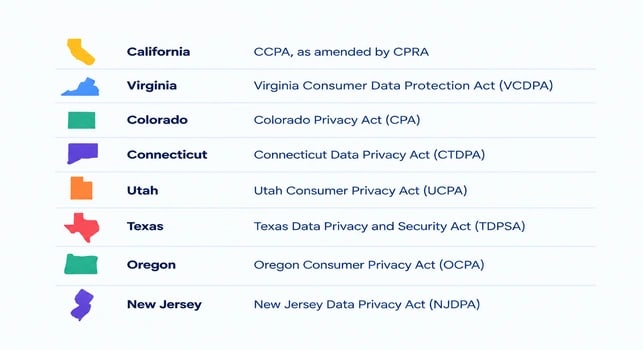
State-level privacy laws include laws enacted by individual states in the United States (U.S.). Individual state governments enact state-level privacy laws, not a single federal consumer law.
Law firms operating in each state must follow that state's laws.
The following are the laws enacted under each state:
Benefits of effective legal data management
Find accurate information faster
Legal data management helps attorneys and other legal professionals in law firms retrieve accurate information when they need it. It saves the organization time and resources by reducing the effort required to access information. This happens because legal data is organized and structured, making it easy to locate.
Reduce duplicate and outdated files
Maintaining well-structured legal data with regular audits and data cycles eliminates duplicate and outdated information. Regular audits and data cycles provide a clear view of what data is stored as of today and what is removed. The key is that audits provide live data insights by removing outdated information and duplicate data.
Protect confidential legal information
Implementing legal data management can protect confidential legal information with multiple layers of security. Legal data is secured with multiple layers of protection. These layers include multi-factor authentication and attribute-based access control; access is granted based on the attorney's attributes (shift hours, work location) and the document's attributes (owner, document type).
Lower eDiscovery costs and risk
An effective legal data management plan lowers the eDiscovery cost and risk. By reducing the cost of collecting Electronically Stored Information (ESI), such as emails, documents, presentations, databases, voicemails, audio files, and other information from social media and websites. It also eliminates the risk of missing relevant information during eDiscovery.
How AI is changing legal data management
According to the 2026 AI in professional services report, 41% of law firms have adopted AI in their workflow. This number may seem staggering, but it reflects AI's real impact on the legal industry.
Search legal data using natural language
Attorneys can search legal data using natural language from a knowledge base. search system identifies what the user is actually looking for rather than matching individual words. This eliminates the need to use exact words in the query that are present in the source documents.
Find information across multiple sources
A legal knowledge base platform can retrieve relevant answers by reviewing multiple uploaded sources. It does not provide answers based on a single uploaded document. As a result, it improves the user experience and provides answers that match the user's intent.
Turn documents into searchable knowledge
Legal data management can help turn your documents into a searchable knowledge repository. It centralizes all the documents across the law firm. The system stores documents from multiple teams across the firm and can serve as a single source of the organization's knowledge.
Get answers grounded in your organization's data
Connect your legal data to a knowledge base to retrieve grounded answers based on your organization's uploaded data. This provides a clear picture of the answer's accuracy. It builds trust that answers aren't hallucinated or pulled from external sources.
Verify answers with source citations
The knowledge base provides answers with source citations. It helps the legal team clearly understand where each answer comes from. It serves as the main way to verify the knowledge source's compatibility and the answer's accuracy.
How to choose legal data management software
Check the data sources it supports
Before choosing legal data management software, check the data sources and formats it supports. The legal data source formats must include PDF files, public URL links, TXT files, and OCR text. Find out whether your knowledge base software is compatible with the above-mentioned sources.
Evaluate search and retrieval features
Evaluate search and retrieval features; check whether the system supports hybrid search and whether it replaces traditional search with hybrid search. Hybrid search finds answers based on query context rather than exact word matches. It helps retrieve the correct answer satisfying the user's intent.
Check security and access controls
Check for security and access controls; find whether the system has SSO and SCIM. SSO stands for single sign-on. It lets users log in to multiple applications with one set of credentials through a central identity provider. Ensure your knowledge base has SSO provisioning.
SCIM stands for System for Cross-Domain Identity Management. SCIM is a standard for automatically creating, updating, and deactivating user accounts.
Consider integrations with existing tools
Find out whether the data management software is compatible with the tools you use to perform daily tasks in the organization.
For example, check whether it captures and stores information from communication channels such as Slack and email. Also ensure it can retrieve information from OneDrive, Google Drive, and other file storage platforms.
Compare cloud and self-hosted deployment
Two deployment types are available:
- With cloud storage, the software runs on the service provider's infrastructure.
- In self-hosted deployment, the software runs on your organization's infrastructure. Here, data is stored on servers controlled by the organization.
Compare AI tools based on features and use cases
Gather information about multiple AI tools and analyze their features and use cases. Find the tool that best fits your law firm's needs. As part of analyzing use cases and features, check user-friendliness. Because the AI tool is for attorneys and other legal professionals in the law firm, they do not have technical expertise.
Connect your legal data with Accurez for easy search and retrieval of documents
You can connect your legal data with Accurez by uploading files, URLs, and drive links. Accurez is an AI-powered, self-hosted knowledge base platform that quickly retrieves information from the uploaded files and legal data. It performs hybrid search that returns answers by finding exact matches to query words along with the query context.
The answers are grounded, and source citations appear for each answer, clearly showing where they come from in the uploaded documents. With Accurez, attorneys can save up to 15 hours every week by reducing the time spent retrieving information during legal research.
Get instant answers from your documents
Conclusion
Legal data management is an important part of a law firm; it is as important as acquiring clients. To make the process easier, legal data management software is essential. I hope this blog has given you a useful perspective on adopting an AI knowledge management tool for the law firm.
How we researched this article
Published research supports the statistics and claims in this article.
Statistics and claims in this article come from these sources.
Bloomberg Law’s Attorney Workload and Hours Survey - https://assets.bbhub.io/bna/sites/18/2025/03/Attorney_Workload-Hours_032425.pdf
California Department of Justice - https://oag.ca.gov/privacy/ccpa
Written by: Shushmmitha (Technical Content Writer)
Reviewed by: Sid (Industry Specialist)
Get instant answers from your documents
Similar blogs






See Accurez for yourself
Come with questions and meet the people behind the product.