


Inside the article
Key Takeaways
- A knowledge management system is software that lets you store, update, retrieve, capture, and organize information.
- The key difference between a knowledge base and a KMS is that a knowledge base stores information, while a KMS manages, organizes, shares, and applies that knowledge.
- A knowledge management system stores three types of knowledge: explicit, implicit, and tacit knowledge. KMSs come in several forms, such as customer-facing knowledge bases and AI assistants.
- A KMS manages organizational knowledge, while an LLM generates and understands text based on patterns learned from large datasets.
Summarise this blog for me
Too busy to read the full article? Get a quick summary in your preferred AI tool.
What is a knowledge management system?
A knowledge management system is software that helps to capture, store, organize, update, access, and retrieve information. This system supports evidence-based decisions and coordinates work across the organization. A knowledge management system ensures that necessary information is available at the right time.
Difference between a knowledge management system and a knowledge base
Types of knowledge in a knowledge management system
Explicit knowledge
Explicit knowledge is knowledge that a person can easily express, articulate, and record. Teams can document and transfer this type of knowledge to others. It is quantifiable knowledge that can be stored in a database.
"Explicit knowledge should not be limited to a single person".
For example, IT teams must document troubleshooting procedures by capturing each person's explicit knowledge. In troubleshooting, each person may find a solution; hence, it is essential to document each person's findings.
Tacit knowledge
Tacit knowledge is knowledge that people cannot easily transfer because they develop it through personal experience and practice. Simply put, it is knowledge that is gained through personal experience, insights, and intuition.
A good example of tacit knowledge is leadership quality. A plant manager develops leadership skills through years of field experience, working with machines, calibrating them, handling repairs and maintenance, and leading the team.
Implicit knowledge
Implicit knowledge comes from executing explicit knowledge. You can acquire this type of knowledge through continuous practice. You can't easily articulate or structure it.
Consider a sales manager's negotiation skill gained over years of handling multiple clients' needs, requirements, sales pitches, and behaviour; this is implicit knowledge.
Types of knowledge management systems
Internal knowledge bases
An internal knowledge base helps an organization's teams clarify doubts. An internal knowledge base reduces dependence on subject experts or senior colleagues. This knowledge base reduces time spent searching for specific information, improving employee productivity.
Common examples include policies, guidelines, procedures, and project documentation.
Customer-facing knowledge bases
Customer-facing knowledge bases help resolve consumer queries and doubts quickly, without delays, to maintain a good customer experience. Customer-facing knowledge bases include help centers, how-to articles, demo videos, and release notes.
Help centers provide FAQs, installation guides, product information, and troubleshooting support. How-to articles explain product workflows step by step. Demo videos visually show how the product works. Release notes highlight the latest updates, additions, and removals.
Collaboration and community platforms
Collaboration platforms are part of the knowledge base where internal teams collaborate and share knowledge; they act as a medium for direct knowledge sharing across the organization.
Community platforms are places where customers and the organization's support teams have direct conversations.
Example: Discussion Forums, interactive forums.
AI-powered knowledge assistants
AI-powered knowledge assistants are trained on the uploaded document source. These assistants act as a personal assistant for individual team members by answering questions in natural language.
AI assistants retrieve grounded answers from the uploaded documents. You can assign these AI knowledge assistants to a single team or the entire organization, depending on their knowledge source and purpose.
Learn more about the types of knowledge management systems.
KMS vs LLM: What's the difference?
Benefits of a knowledge management system
Here are some key benefits of a knowledge management system:
- A knowledge management system supports faster, more accurate information by keeping it consistently up to date.
- It improves cross-department collaboration by helping teams coordinate and complete tasks on time through shared information.
- Knowledge management reduces data redundancy and anomalies, keeping the organization's knowledge source consistent and scalable.
- The data stored in the KMS stays secure, trustworthy, and usable for evidence-based decisions.
The hidden cost of not having a knowledge management system
How much time organizations actually lose to knowledge gaps
A knowledge gap occurs when employees lack information and need a source to fill it. To employees, it may seem like just unknown information, but it can disrupt an organization's routine operations.
On average, employees spend 3.6 hours per day searching for information, which leads to frustration and hurts productivity. The impact can be negligible if you limit it to a single day.
But over a month, that is nearly 108 hours, and over a year, it is 54 days.
The real cost of rebuilding knowledge you already had
Rebuilding a knowledge base costs much more than building one from scratch. When an organization fails to preserve existing knowledge, it can become dependent on a single person who holds critical knowledge. In these cases, organizations must start from scratch when an experienced employee leaves. This creates time and cost constraints.
According to PR Newswire, businesses lose $47 million in productivity each year because of a lack of knowledge sharing.
What happens when someone leaves
What happens when someone with practical knowledge leaves the organization?
According to 12 knowledge management statistics for 2026, 42% of the organization's knowledge is held by a single individual.
When employees leave, they take their experience and know-how with them. This is especially true for tacit knowledge, the kind that's hard to write down or teach to someone else, which gets lost if it was never documented or shared.
This can affect the team's ability to handle unusual situations, troubleshoot problems, work with customers, or navigate internal processes.
Use cases of a knowledge management system
1. Employee onboarding and training
A knowledge management system can assist in employee onboarding. For example, when a new employee joins the company, they need guidance in the initial stage to clarify questions about the organization's procedures. Knowledge management makes it easy to access FAQs, company policies, role-specific information, and other training documents.
A knowledge management system can reduce the time senior employees spend helping new joiners. This saves the organization resources.
2. Customer self-service support
Customer self-service support is a crucial part of knowledge management. It must be reliable, provide accurate information, and direct customers to trusted sources for answers.
The ScienceDirect 2025 study compared traditional search methods and an AI chatbot for IT support, both based on the same knowledge base, and found that users rated the chatbot higher.
The study found that 57% of user questions were answered quickly, showing that AI can make it easier to access knowledge base information through conversational self-service.
3. Compliance and regulatory tracking
Compliance and regulatory tracking is essential to staying compliant with the latest government regulations. Knowledge management helps compliance teams access internal policies, review data, audit requirements, and track the latest regulatory changes.
This lets employees access the latest approved information without searching across multiple sources.
4. Sales enablement
The sales team needs quick access to product features, product descriptions, pricing guidance, sales quotations, sales playbooks, ledger copies, and lead sheets. A knowledge management system can bring these resources together so sales representatives can find relevant information during customer conversations.
For example, when a customer asks about the product pricing plan, the sales representative must be able to answer immediately and support sales negotiations.
5. IT service management and incident resolution
IT teams must document the cause of bugs or errors in functionality, glitches, exceptions, or other faults. Document all such errors in a knowledge management system. This can serve as a reference; when the same kind of bug occurs, we can fix it more easily. Teams can prevent even technical glitches.
The IT team must turn resolved incidents into knowledge articles. This can save time when the problem happens again.
Knowledge management system best practices
Start with the most asked questions first
The first and most important step is figuring out the recurring questions employees ask. Then find the reason and root cause behind the question. Then find answers and update the knowledge management system if you can't find them. Building content around these questions can prevent them from recurring.
Assign a dedicated knowledge owner
Assign a dedicated knowledge owner to each team; their responsibilities must include monitoring knowledge sharing. Monitor team members to prevent knowledge stagnation. Require knowledge owners to conduct regular knowledge assessments.
Make knowledge easy to find before making more content
Before adding or updating content in the knowledge base, ensure existing content is valid, verified, and consistent across all platforms. The goal is not simply to create more content. The goal is to help employees find the right information when they need it.
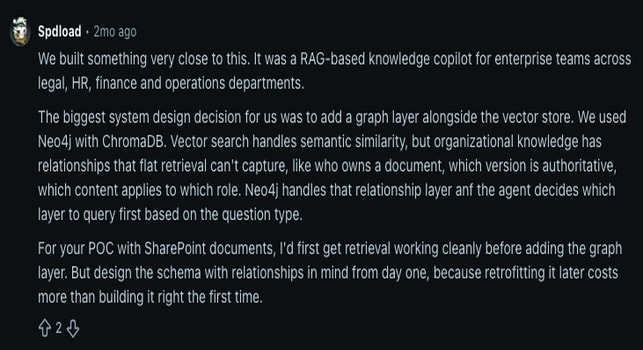
Image source: Reddit
To attain the goal, a normal search done in the knowledge base is not always enough; we need a robust system like a RAG-based knowledge base that uses semantic search. These insights come from the Reddit discussion above.
If you are looking for an efficient, RAG-based self-hosted knowledge base that performs hybrid search to retrieve relevant information from your knowledge base, Accurez could be a great fit.
To learn more about a RAG knowledge base, read what a RAG knowledge base is.
Connect the KMS to real work
Connect your KMS with your organizational teams. Ensure that your teams get real-time access to the stored content. You may need information at any time, but you can't predict when you'll need it. For example, a finance employee could search expense policies while reviewing a reimbursement request.
Schedule regular content audits
Perform regular audits of policies, procedures, product information, regulations, and internal process documents because knowledge doesn't remain static. Regular content audits help teams identify outdated, duplicate, incomplete, or conflicting information. Organizations can set review schedules and archive content that is no longer relevant.
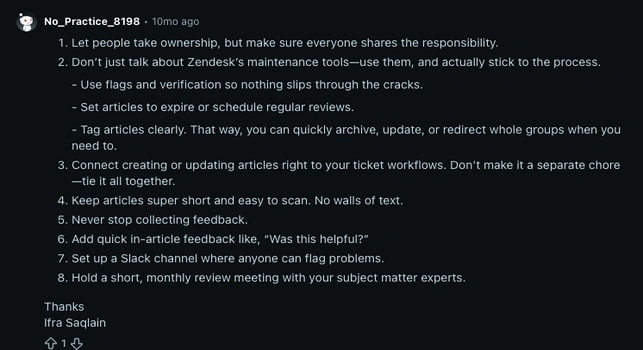
Image source: Reddit
In the Reddit discussion above, the Redditor explicitly outlines several steps to prevent the knowledge base from becoming cluttered.
Use AI carefully with trusted sources
Using AI for knowledge management is like a double-edged sword because you must ensure that the data you provide remains secure. Feeding sensitive information into the knowledge management system and using AI can even compromise your organization's data privacy.
Measure what matters
Don't measure a KMS only by how many documents employees upload. Organizations should measure whether people actually use the knowledge and benefit from it.
Useful measures include:
- KMS adoption: How many employees regularly use the knowledge management system?
- Knowledge reuse: How often do employees find and use existing information?
- Search effectiveness: Can employees quickly find the information they need?
- Content quality: How much outdated, duplicate, or irrelevant content is still in the system?
- Time to productivity: How quickly can new employees learn the information they need and start handling their work independently?
- Knowledge gaps: Which common questions or topics do employees still struggle to find answers for?
- Business impact: Does easier access to knowledge help employees work faster, serve customers better, or resolve problems more efficiently?
Get instant answers from your documents
Conclusion
I believe after reading this blog, you have a better understanding of KMS. This blog has steered you in the right direction on the types of knowledge, the benefits of a knowledge management system, its use cases, and how to choose the right KMS.

Shushmmitha
Shushmmitha writes about AI and knowledge management, focusing on how organizations can capture, organize, and access business knowledge more effectively. Her content helps business and product teams understand practical ways to use modern technology for better knowledge management.
Get instant answers from your documents

See Accurez for yourself
Come with questions and meet the people behind the product.