


Knowledge Base Articles: Meaning, Examples, Templates

Written by: Shushmmitha (Technical Content Writer)
Reviewed by: Sid (Industry Specialist)
Inside the article
Key Takeaways
- A knowledge base article is a documented source of organizational information that helps users solve their issues independently.
- Knowledge base articles increase productivity, enhance team collaboration, reduce redundant queries, and keep organizational knowledge up to date.
- Creating a knowledge base article involves essential steps: identifying the audience, choosing the right format, structuring the content, using an instructional tone, and adding necessary visual aids.
- Maintaining knowledge base articles comes with several challenges, including keeping content up to date and ensuring accuracy.
Summarise this blog for me
Too busy to read the full article? Get a quick summary in your preferred AI tool.
What is a knowledge base article?
A knowledge base article is a documented source of the organization’s knowledge that helps users solve problems independently. It contains structured information about the product, services, stakeholders, and how the organization operates. A knowledge base article is stored in a central repository called the knowledge base.
How knowledge base articles add value to organizations
Reduce time spent searching for information
According to the Harvard Business Review “toggle tax” study, employees spend 5 working weeks per year toggling across multiple applications and sites to find information.
A knowledge base article reduces search time by keeping information structured, well-organized, and stored in a central hub. With a title, metadata, and relevant category tags, it makes information navigation easier and retrieval faster.
Improve collaboration across teams
A knowledge base article improves collaboration by letting teams across the organization access, share, edit, and retrieve information. This makes the knowledge equally available to everyone. It improves cross-functional interaction and increases visibility into how teams work, fostering a mutually beneficial environment.
Reduce repetitive support queries
When employees and customers cannot find answers, they keep nagging the support team. Knowledge base articles answer these repetitive queries and are easy to access because they are stored in one central place. It provides self-service access to relevant guides, documentation, and FAQ answers.
For example, InspectionXpert discovered that 50% of its support tickets resulted from customers not knowing how to use its product. By expanding and improving its knowledge base source, the company reduced overall support tickets by 25%.
Keep organizational knowledge consistent and up to date
Knowledge base articles keep your organization’s knowledge consistent and up to date. As owners of the knowledge base articles, take responsibility for making the necessary up-to-date changes. This strengthens the organization’s knowledge resilience. Learn more about how to organize your knowledge base.
How to write an effective knowledge base article
Identify the audience and define their problem
Usually, knowledge base articles are written for internal teams and external stakeholders. Identify the end user of your knowledge base and find the purpose it must serve. Find problems that are visible and prolonged, such as employees struggling to find relevant information, accessing task-specific guidance, and relying on colleagues to resolve recurring queries.
Choose the right article format
Choose the right article format based on your end users' needs and expectations. For example, an external knowledge base should include easy-to-use articles such as FAQs, How-to articles, and user manuals. These formats help customers find answers quickly, satisfying their intent without draining their attention spans, especially for those who need quick answers.
Write a clear and searchable title
Titles act as a blueprint defining what is covered under each section of your content. So, draft articles with clear and meaningful titles to make them searchable. This helps users navigate the answer section quickly without prolonged searching or getting zoned out.
Find knowledge beyond keywords
Accurez's semantic search understands the meaning behind your queries, helping you find relevant information faster.
Find answers faster with Accurez.
Structure the article for easy scanning
Use bullet points instead of boring paragraphs, highlight key information, use tables to distinguish information, and include images and screenshots. This makes your content clear and well-structured, and easy to skim. Skimmable content is essential for readability and improves the user experience.
Write clear and concise instructions
Your knowledge base article must be curated to give a solution to the user's problem, not to educate them. To ensure this, write the steps clearly and concisely in an instructional tone, getting straight to the point rather than sounding conversational. This helps the user feel satisfied quickly without frustrating them.
Add visuals and supporting resources
Add necessary visuals, as visuals convey the content more effectively than words. Use product screenshots, workflow images, flow charts, and fishbone diagrams (cause-and-effect diagrams) as needed. This can make your knowledge base article more engaging and help the user.
Review the article for accuracy and completeness
Schedule regular content audits of knowledge base articles to determine whether they are up to date and to identify obsolete content. The subject matter expert must conduct the audit. As part of the review, verify content accuracy to ensure it satisfies user intent and provides completeness to the article.
Publish, monitor, and update the article
Publish the knowledge base article into the centralized knowledge repository. After publishing, ensure the author monitors the content to keep it aligned with dynamic changes. To keep the content fresh, assign the author responsibility for updating it regularly as the organization changes.
Common formats for knowledge base articles with examples
Troubleshooting and how-to articles
- Step-by-step guides - Step-by-step guides break down time-consuming processes; they are usually written as numbered lists with clear, concise titles, generally in active voice. This format is widely used to help customers set up products and services.
- Troubleshooting guides - Troubleshooting guides contain sequential step-by-step solutions to technical problems that occur in software services and products.
- Checklists - A checklist is a clear list of individual actions that are used to accomplish particular tasks. This format is used as a knowledge source for both internal and external teams of the organization and serves as a self-service knowledge base.
FAQ and self-service articles
- Question-and-answer articles - These articles address the user’s pain point in a conversational, direct approach and provide easy-to-understand answers.
- FAQ lists - A list of the most commonly asked questions with straightforward answers. It provides quick answers to user queries.
- Decision guides - A structured written workflow that guides users through complex decisions by evaluating alternatives and prioritizing them.
Product and technical documentation
- Product guides - A product guide is a resource that explains how a product works and how users can use it to achieve specific goals.
- Feature guides - A feature guide is a well-written collection of information that helps users identify a feature's specific use case by highlighting the need and the problem it solves.
- Configuration guides - Configuration guides provide structured step-by-step instructions on how to set up, customize, and adjust the product or services.
- Technical references - Technical references are reliable manuals that describe a software product’s specifications, parameters, functions, APIs, and operational rules.
Policy, procedure, and best practice articles
- Policy documents - Policy documents are structured sets of guidelines that outline the rules, regulations, and expectations needed to achieve a particular goal. Most organizations use this format to document their operational policies.
- Standard operating procedures (SOPs) - SOPs are procedures for performing routine tasks in an optimized manner to increase efficiency, reduce errors, and overcome obstacles.
- Best practice guides - A documented collection of proven, efficient, and effective methods to accomplish a particular task.
Onboarding and training articles
- Getting started guides - An introductory document that provides a brief overview of the employee's role and responsibilities. It is mainly designed to help new joiners understand the work environment.
- Training guides - Training documents that include modules on specific topics employees must know to complete tasks in a specific domain.
Templates for creating effective knowledge base articles
Template for creating informational articles
Use this template to develop informative articles that help users understand key concepts, explore important details, and gain useful insights on a particular topic.
Download as PDF: Download
Template for creating how-to articles
Use this template to create practical how-to articles that break down complex processes into simple, actionable steps.
Download as PDF: Download
Template for creating troubleshooting articles
Use this template to document common problems and provide clear, step-by-step solutions to help users resolve issues.
Download as PDF: Download
Template for creating FAQ articles
Use this template to structure frequently asked questions and provide clear, relevant answers that help users find the information they need without contacting the support team.
Download as PDF: Download
Template for creating standard operating procedures (SOPs)
Use this template to document standard processes, define responsibilities, and provide consistent instructions that help teams perform tasks accurately and efficiently.
Download as PDF: Download
Challenges organizations face with knowledge base articles
Teams struggle to update old articles affected by product changes
In common, organizations struggle to keep their knowledge base articles updated as products evolve. They fail to track version updates and product upgrades, and they don't document future enhancements. This happens because product updates happen so often. Each time, it slips from the organization's memory, creating a knowledge gap.
A real-world perspective on documentation challenges
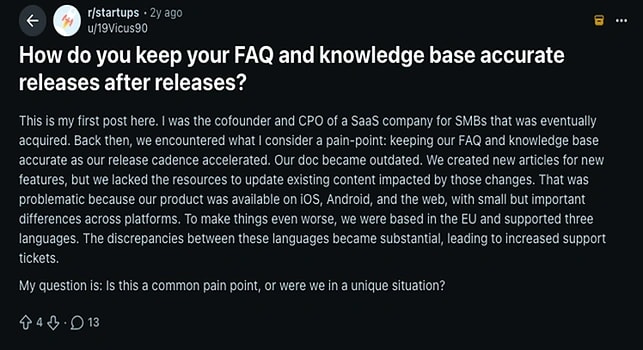
Image source: Reddit
A cofounder of a SaaS company highlights the challenges organizations face in keeping their knowledge bases and FAQs up to date amid frequent product updates. The Redditor points out that the organization keeps creating new articles for consecutive feature updates but fails to update existing product documents.
Incorrect AI-generated answers can frustrate customers
Using AI agents and chatbots in customer support to retrieve answers from knowledge base articles for users' queries is insufficient. This happens because AI can hallucinate and give wrong answers, and it may repeat an incorrect answer to the same question. This frustrates customers and leads them to raise a support ticket.
When AI answers create more confusion than clarity

Image sources: Reddit
The discussion highlights that conversational AI can fail to understand complex customer issues, provide irrelevant answers, and push customers toward human support instead of resolving their problems.

Image sources: Reddit
From the Reddit discussion above, it is evident that a chatbot that sounds helpful but fails to resolve the customer's actual problem can damage trust and increase support workload rather than reduce it.
Customers skip the knowledge base and go straight to support
Most often, customers contact the support team directly rather than searching the self-service knowledge base. This happens because customers usually seek direct attention for their problems rather than a self-help approach.
Only 14% of customer service issues are fully resolved with self-service articles. As a result, the remaining issues are directed to the service team, showing that customers rely more on support teams than on self-service knowledge base articles.
Transform your knowledge base into a smarter resource with Accurez
- Accurez is self-hosted knowledge base software that lets you upload knowledge base articles used across your organization.
- It helps you retrieve answers to users' queries from the uploaded knowledge source by using hybrid search to find the query's context, not just keyword matches.
- The retrieved answers are grounded with relevant source citations that show the exact documents they come from.
- Dedicated AI assistants can be assigned to customize the answers provided to users by adjusting the flexibility of grounded-answer generation.
Get instant answers from your documents
Conclusion
Organizations generate vast amounts of information on their day-to-day operations. Information must be converted into valuable knowledge through proper documentation. A knowledge base article helps turn scattered information into a well-documented resource. As a result, it supports knowledge sharing, simplifies routine tasks, reduces repeated work, and helps organizations retain important information as they grow.
How we researched this article
Published research supports the statistics and claims in this article.
Statistics and claims in this article come from these sources.
Reddit:
- https://www.reddit.com/r/startups/comments/1f041ij/how_do_you_keep_your_faq_and_knowledge_base/
- https://www.reddit.com/r/automation/comments/1rf7o8d/every_ai_chatbot_ive_tried_in_the_last_year_has/
- https://www.reddit.com/r/CustomerSuccess/comments/1qjr6bt/intercom_fin_style_chat_vs_escalationfirst_ai/
Written by: Shushmmitha (Technical Content Writer)
Reviewed by: Sid (Industry Specialist)
Get instant answers from your documents
Similar blogs




See Accurez for yourself
Come with questions and meet the people behind the product.